Nel mio libro “AI Art”, pubblicato a giugno dell’anno scorso, per chi volesse ottenere risultati veramente professionali suggerivo Midjourney come piattaforma in grado di offrire una qualità ineguagliabile (allora), anche se disponibile solo a pagamento.
Google ha appena aggiornato il suo modello grafico, e direi che Midjourney ha le ore contate (per fortuna i principi che espongo nel libro sono validi a prescindere dalla piattaforma).
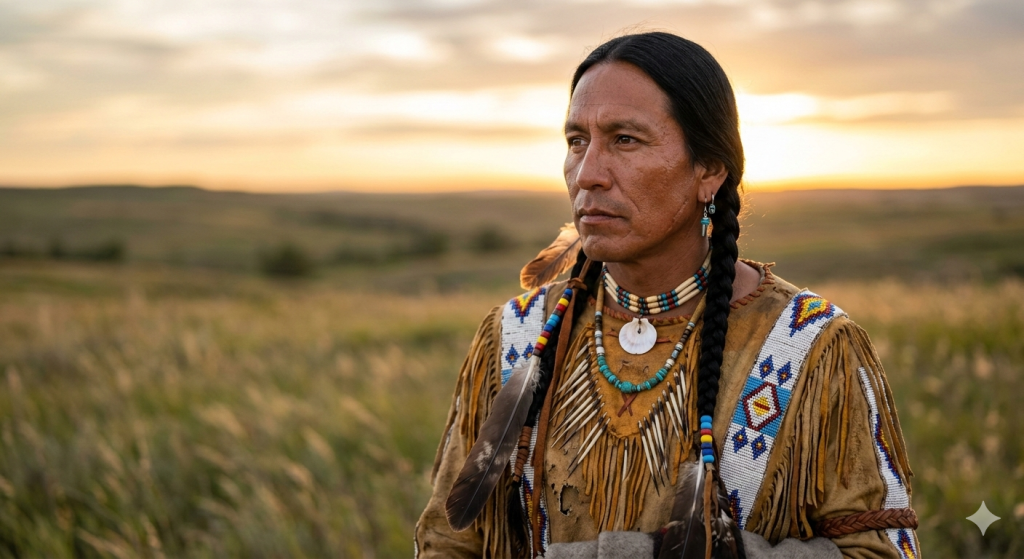
Eccovi un esempio di immagine generata dal nuovo Nano Banana con questo prompt: “Ritratto fotorealistico di un guerriero nativo americano di circa 40 anni, con pelle ramata segnata dal sole e sottili linee d’espressione, capelli lunghi e lisci color nero corvino raccolti in una treccia, occhi profondi e contemplativi. Indossa abiti tradizionali in pelle scamosciata decorati con perline artigianali e piume naturali, dai toni terra e ocra. Luce calda dell’ora dorata proveniente da destra, bassa sull’orizzonte, che crea un contrasto morbido e un’illuminazione pittorica in stile Rembrandt, enfatizzando la texture della pelle e dei materiali. Scattato con Nikon Z9 e obiettivo 85mm f/1.4. Profondità di campo ridotta, sfondo sfocato di una prateria aperta con erba alta mossa dal vento.”
Google ha ridotto l’accesso gratuito a Gemini 3 Pro dopo un’improvvisa ondata di richieste seguita al lancio del modello in Italia e dell’engine visivo Nano Banana Pro. Il limite iniziale di 5 prompt al giorno (e 3 immagini per Nano Banana Pro) è stato sostituito da un generico “Basic access” dai confini variabili, segno di una gestione più elastica per contenere il traffico. Anche NotebookLM ha dovuto sospendere temporaneamente funzioni chiave come Infographics e Slide Decks per gli utenti free, applicando limiti aggiuntivi ai piani Pro a causa di un sovraccarico dei server. Le funzionalità visive, appena integrate nella scheda Studio, promettevano una forte spinta creativa, ma ora risultano parzialmente inaccessibili. La mossa indica che Google mira a preservare la stabilità del servizio e che potrebbe spingere ulteriormente verso i piani a pagamento in futuro.
Ho appena testato il prompt “49,3684327, -0,8681529 6 giugno 1944” dopo avere individuato su Google Maps un punto su una delle spiagge della Sbarco in Normandia, ottenendo l’immagine che vedete qui sotto. Prima che fosse generata, il nuovo algoritmo di “ragionamento” alla base di Nano Banana Pro ha seguito questo percorso:
Analyzing the Input I am now delving into the provided coordinates and date. My initial step involves interpreting the input data. I need to understand the implications of the coordinates for a specific location in history and how the date impacts the scene. This requires careful consideration of historical context and geographical details.
Formulating a Narrative I have successfully identified the core elements of the scene. The provided coordinates and date pinpoint the historic D-Day landings at Omaha Beach. I’m focusing on crafting a historically accurate representation, paying close attention to the details of the invasion. I’ve considered the soldiers, landing craft, and the somber atmosphere, to refine the visual narrative.
Verifying Historical Accuracy I’m checking that the generated image aligns with the user’s request. It seems the visual captures the scene near Omaha Beach on D-Day, as the user specified, illustrating the historical event with soldiers on the shore and cliffs in the backdrop.
Refining the Scene’s Details I’ve examined the visual and confirmed its alignment with the user’s instructions. The image indeed represents the D-Day landings near Omaha Beach, as requested, based on the provided coordinates and date. The soldiers on the shore and the cliffs are correctly depicted. The image is consistent with the black and white photograph specification. I’m now making final checks.
Formulating a Narrative I have successfully identified the core elements of the scene. The provided coordinates and date pinpoint the historic D-Day landings at Omaha Beach. I’m focusing on crafting a historically accurate representation, paying close attention to the details of the invasion. I’ve considered the soldiers, landing craft, and the somber atmosphere, to refine the visual narrative.
Verifying Historical Accuracy I’m checking that the generated image aligns with the user’s request. It seems the visual captures the scene near Omaha Beach on D-Day, as the user specified, illustrating the historical event with soldiers on the shore and cliffs in the backdrop.
Refining the Scene’s Details I’ve examined the visual and confirmed its alignment with the user’s instructions. The image indeed represents the D-Day landings near Omaha Beach, as requested, based on the provided coordinates and date. The soldiers on the shore and the cliffs are correctly depicted. The image is consistent with the black and white photograph specification. I’m now making final checks.
Osservate, nell’immagine, il pannello a destra di NotebookLM e noterete due nuovi strumenti: Infografica e Presentazione.
Entrambi sfruttano la potenza di generazione grafica di Nano Banana, come è già avvenuto con le Overview Video. Ma non finisce qui, perché sia in questi nuovi strumenti sia nelle panoramiche video ora potete personalizzare lo stile della grafica, ottenendo proprio il genere di immagini che serve al vostro materiale di comunicazione.
A quanto pare, Google ha smesso di annunciare e poi rimandare, e implementa finalmente le novità rendendole disponibili a livello globale, alleluia!
Adobe integra immediatamente il modello Gemini 3 Nano Banana Pro di Google in Firefly e Photoshop, ampliando l’offerta di modelli AI disponibili nelle sue applicazioni creative. L’obiettivo è creare un ecosistema aperto e modulare che permetta ai professionisti di scegliere il modello più adatto alle proprie esigenze senza uscire dagli strumenti Adobe. In Firefly, il modello è accessibile nelle funzioni Text-to-Image e Firefly Boards, potenziando le fasi di concepting e sviluppo visivo. In Photoshop migliora Generative Fill, offrendo generazioni più realistiche e immagini di qualità superiore, facilmente perfezionabili con gli strumenti tradizionali. Adobe incentiva l’adozione offrendo generazioni illimitate su Firefly fino al 1° dicembre per gli utenti Creative Cloud Pro e Firefly.
Non solo Gemini 3: arriva Nano Banana Pro, il modello grafico che “ragiona”.
Ho appena testato un prompt come quelli usati per generare le immagini allegate al post dell’ultimo GPT per le immagini “post-apocalittiche contempletative a matita”(che trovate nella sezione dedicata), ovvero “Graphite pencil aesthetic, layered shading, erosion-softened lines. Foreground rubble on a fractured floor; mid-ground skeletal buildings; distant ruins fading into mist. Heavy stillness, symbolic beams of light through broken clouds. A lone survivor sits on a broken ledge, facing the wasteland, back to the viewer. Their posture is slack, contemplative. Behind them: the faint suggestion of safety; before them: destruction without end.”
Il nuovo modello grafico di Google, prima di generare l’immagine, ha “ragionato” per orientare il risultato finale verso l’intento del mio prompt, in questo modo:
Considering the Details
I’m currently focused on the visual elements. The task involves creating a lone survivor in a desolate, post-apocalyptic environment using a graphite pencil style. This means prioritizing layered shading and softened lines for the image. The goal is to capture the bleakness and solitude of the scene.
Formulating a Detailed Prompt
I’ve been breaking down the request to create a precise prompt. The key elements are the graphite pencil style and the desolate setting, and I’ve focused on how to capture these specifics. I’m aiming for a monochromatic sketch on textured paper with layered shading and soft lines. The goal is to convey a sense of solitude and bleakness through the visual description. The details include a lone figure on a ledge, amidst rubble and skeletal structures.
Examining Image Compliance
I’m currently reviewing the image to ensure it aligns perfectly with the user’s detailed specifications. The goal is to verify that the visual elements – the rubble, the skeletal structures, the contemplative figure – are all present and accurately depicted. Emphasis is placed on confirming that the lighting and overall atmosphere precisely match the requested tone.
Assessing Prompt Adherence
I’ve examined the image against the user’s detailed request. My primary focus was the successful recreation of a graphite pencil drawing style, including layered shading and softened lines. I confirmed the rubble, skeletal structures, distant ruins, and contemplative figure all accurately reflect the original prompt. The symbolic light and heavy atmosphere also match well. I will now prepare the image for the next step.
Il risultato lo vedete qui sotto. In ogni caso io preferisco lo stile delle immagini generate da Grok, che potete appunto vedere nel post precedente dedicato al GPT.